ASP.NET筆記之 Request 、Response 與Server的使用_.Net教程
推薦:ASP.NET編程的十大技巧1、在使用Visual Studio .NET時(shí),除直接或非引用的對(duì)象外,不要使用缺省的名字。 .NET帶來(lái)的好處之一是所有的源代碼和配置文件都是純文本文件,能夠使用Notepad或WordPad等任意的文本編輯器進(jìn)行編輯。如果不愿意,我們并非一定要使用Visual Studio .NET作為集成開發(fā)環(huán)
1、Request 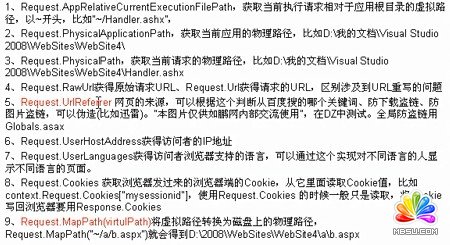
下面做一個(gè)實(shí)例,通過(guò)Request的一些方法來(lái)判斷瀏覽圖片是不是在內(nèi)部瀏覽,還是直接按網(wǎng)址瀏覽或者被外部使用
<%@ WebHandler Language="C#" Class="image_Test" %>
using System;
using System.Web;
public class image_Test : IHttpHandler {
public void ProcessRequest(HttpContext context)
{
context.Response.ContentType = "image/JPEG";
//如果直接訪問(wèn)URLreferrer 就是null ,如果嵌入到頁(yè)面中請(qǐng)求
//URLreferrer就是頁(yè)面的地址
string picPath=HttpContext.Current.Server.MapPath("DSCF0738.JPG");
using (System.Drawing.Bitmap bitmap = new System.Drawing.Bitmap(picPath)) {
using (System.Drawing.Graphics graphic = System.Drawing.Graphics.FromImage(bitmap))
{
//不過(guò)還是太脆弱,因?yàn)閁rlReferrer還是由客戶端提交
//迅雷破解毫無(wú)鴨梨
if (context.Request.UrlReferrer == null)
{
graphic.Clear(System.Drawing.Color.White);
graphic.DrawString("禁止直接瀏覽圖片", new System.Drawing.Font("宋體", 15),
System.Drawing.Brushes.Red, 0, 0);
}
//http://127.0.0.1:32581/WebSite_zzl01/vivideo_test/request/Request.aspx
else if (context.Request.UrlReferrer.Host != "localhost")
{
graphic.Clear(System.Drawing.Color.White);
graphic.DrawString("圖片只允許在博客園內(nèi)部查看", new System.Drawing.Font("宋體", 15),
System.Drawing.Brushes.Red, 0, 0);
}
//轉(zhuǎn)化成流格式輸出
bitmap.Save(context.Response.OutputStream,System.Drawing.Imaging.ImageFormat.Jpeg);
}
}
}
public bool IsReusable {
get {
return false;
}
}
}
html
<img src="image_Test.ashx" />啦啦啦啦
2、Response
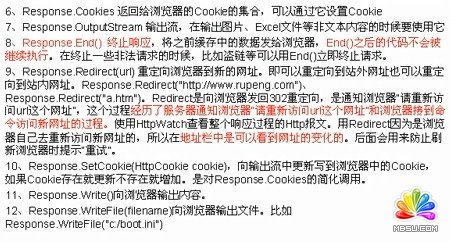
(1)返回 流,以流的形式返回給客戶端
* 每次write,往緩存里存,不是直接給瀏覽器,等到存滿了或者處理完成才發(fā)送到瀏覽器
* Flush方法,立即發(fā)給瀏覽器

(2)反盜鏈等:不往下執(zhí)行了在aspx寫較好
context.Response.End();
(3)aspx 和ashx
像輸出文本、圖片、下載地址最后是寫在ashx里面,而html內(nèi)容則寫在aspx里面
(4)重定向 Redirect
Flush實(shí)例:
<%@ WebHandler Language="C#" Class="response" %>
using System;
using System.Web;
public class response : IHttpHandler {
public void ProcessRequest (HttpContext context) {
//如果是plain則<br/>無(wú)效果
context.Response.ContentType = "text/html";
//耗時(shí)操作
for (int i = 0; i < 20; i++)
{
System.Threading.Thread.Sleep(500);
context.Response.Write("第"+i+"步開始執(zhí)行<br/>");
//采用Flush,立即發(fā)給客戶端,效果很明顯!
context.Response.Flush();
}
}
public bool IsReusable {
get {
return false;
}
}
}
3、server
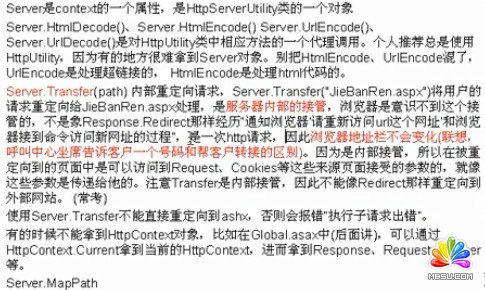
(1)Server.Transfer和 Response.Redirect的區(qū)別
*transfer訪問(wèn)只能是內(nèi)部網(wǎng)站,不能是外部的,而redirect可以
* transfer是網(wǎng)站內(nèi)部接管的,只執(zhí)行一次http請(qǐng)求,而Redirect則是轉(zhuǎn)幾次就執(zhí)行幾次http請(qǐng)求并在地址欄中顯示
* transfer會(huì)直接把各種信息傳過(guò)去而Redirect不會(huì)
* 不能重新定向到ashx transfo

實(shí)例:
using System;
using System.Collections.Generic;
using System.Linq;
using System.Web;
using System.Web.UI;
using System.Web.UI.WebControls;
public partial class vivideo_test_server_server : System.Web.UI.Page
{
protected void Page_Load(object sender, EventArgs e)
{
string text=Request["id"];
if (text == "1") {
Response.Write("一");
}
else if(text=="2"){
//請(qǐng)求的信息都會(huì)傳入服務(wù)器
Server.Transfer("DSCF0738.JPG");
}
else if (string.IsNullOrEmpty(text))
{
Response.Write("空");
}
else {
//不會(huì)取到傳過(guò)來(lái)的參數(shù)
Response.Redirect("蘋果.jpg");
//除非自己給它穿過(guò)去
//Response.Redirect("aaa.aspx?id=1");
}
}
}
分享:使用Fiddler調(diào)試visual studion多個(gè)虛擬站點(diǎn)的問(wèn)題分析本篇文章小編為大家介紹,使用Fiddler調(diào)試visual studion多個(gè)虛擬站點(diǎn)的問(wèn)題分析。需要的朋友參考下
- asp.net如何得到GRIDVIEW中某行某列值的方法
- .net SMTP發(fā)送Email實(shí)例(可帶附件)
- js實(shí)現(xiàn)廣告漂浮效果的小例子
- asp.net Repeater 數(shù)據(jù)綁定的具體實(shí)現(xiàn)
- Asp.Net 無(wú)刷新文件上傳并顯示進(jìn)度條的實(shí)現(xiàn)方法及思路
- Asp.net獲取客戶端IP常見代碼存在的偽造IP問(wèn)題探討
- VS2010 水晶報(bào)表的使用方法
- ASP.NET中操作SQL數(shù)據(jù)庫(kù)(連接字符串的配置及獲取)
- asp.net頁(yè)面?zhèn)髦禍y(cè)試實(shí)例代碼
- DataGridView - DataGridViewCheckBoxCell的使用介紹
- asp.net中javascript的引用(直接引入和間接引入)
- 三層+存儲(chǔ)過(guò)程實(shí)現(xiàn)分頁(yè)示例代碼
- 相關(guān)鏈接:
- 教程說(shuō)明:
.Net教程-ASP.NET筆記之 Request 、Response 與Server的使用
 。
。