網頁設計制作之改進超級鏈接效果(6)_XHTML教程
教程Tag:暫無Tag,歡迎添加,賺取U幣!
對于不經常使用的內置超鏈接可以加上下劃線。
It makes the link stand out a little more than colour alone.
通過對超鏈接使用下劃線(與僅對超鏈接進行顏色變化)更能起到突出超鏈接的作用。
In this example, the underlining works well to distinguish article titles from the sub-title.
在這個案例中,下劃線可以清楚地區分主標題和二級標題。
I think underlining becomes unhelpful when there are numerous inline links in paragraphs, in lists of links, and when there are lots of sets of links on a page.
假如段落中、鏈接列表中或頁面中的超鏈接過多,那對這些鏈接使用下劃線將起不到任何突出作用。
下面兩組超鏈接效果的對比。左邊的超鏈接包含下劃線,右邊則不包含下劃線,具體如下:
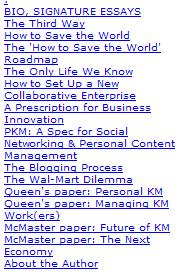

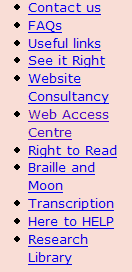

Notice how it's quicker and easier to read the non-underlined blocks of text.
請注重:假如像上面這樣的鏈接列表,那么不使用下劃線將更有助于快速、簡便地閱讀。
In this second example, I have also adjusted the line spacing to make the related words clearer.
在第二個案例中,我還調整了單詞之間的間距以使其看上去更加清楚。
相關XHTML教程:
- 相關鏈接:
- 教程說明:
XHTML教程-網頁設計制作之改進超級鏈接效果(6)
 。
。