用Flash模擬制作Windows系統(tǒng)迷宮屏幕保護(hù)_Flash教程
推薦:Flash簡(jiǎn)單制作實(shí)用的圖片切換動(dòng)畫特效Flash簡(jiǎn)單制作實(shí)用的圖片切換動(dòng)畫特效,好多網(wǎng)站都是利用FlashJS實(shí)現(xiàn)的,今天這個(gè)教程我們用Flash直接制作。動(dòng)畫效果如下。1、首先預(yù)備3-4張大小相同的圖片
用簡(jiǎn)單的幾條Flash Actionscript就可以模擬制作Windows系統(tǒng)迷宮屏幕保護(hù)程序,非常簡(jiǎn)單的一個(gè)教程,前提是你必須熟悉Actinscript。呵呵!
先看效果
制作方法很簡(jiǎn)單,啟動(dòng)Adobe Flash,新建立一個(gè)文檔,自己設(shè)置調(diào)整影片文檔屬性,然后把下面代碼放到第一幀內(nèi)。
import flash.display.BitmapData
a_bmp = new BitmapData(Stage.width,Stage.height,false,0);
b_bmp = new BitmapData(Stage.width,Stage.height,false,0);
this.createEmptyMovieClip("a_mc",1)
this.createEmptyMovieClip("b_mc",2)
a_mc.attachBitmap(a_bmp,0);
b_mc.attachBitmap(b_bmp,0);

然后我們建立一個(gè)影片剪輯,建立什么都可以!在這里我做了一個(gè)矩形,把它轉(zhuǎn)變?yōu)橛捌糨嬙质鞘裁炊夹小?/P>
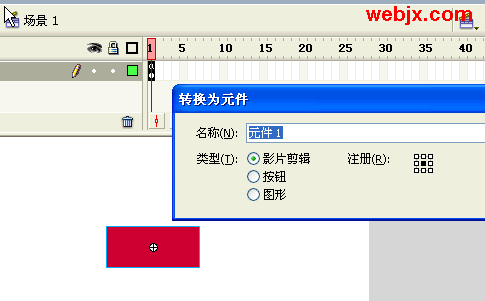
用鼠標(biāo)選擇該影片元件,為該影片元件添加如下Action。
onClipEvent(enterFrame) {
import flash.geom.Matrix
import flash.filters.BlurFilter
m = new Matrix()
z = 1.09
m.scale(z, z)
m.translate((Stage.width-Stage.width*z)/2,(Stage.height-Stage.height*z)/2)
_root.b_bmp.draw(_root.a_mc, m)
_root.a_bmp.draw(_root.b_mc)
if (!counter) counter = 0
counter
for (y=-10; y<10; y ) {
for (x=-30; x<30; x ) {
_root.a_bmp.setPixel(Stage.width/2 x Math.random(),
Stage.height/2 y Math.random(),
counter*(x*y 30*10 counter*100))
}
}
}
測(cè)試下吧!因?yàn)楸容^簡(jiǎn)單,所以不提供源文件下載了!請(qǐng)大家自由練習(xí)。
分享:Flash Actionscript Animation簡(jiǎn)明教程本教程節(jié)選自bit-101.com的未正式出版的新書makingthingsmove的新書介紹。主要內(nèi)容是關(guān)于速度,加速度,彈性,緩動(dòng),摩擦力,重力等內(nèi)容,這里沒(méi)有非常詳盡
- 相關(guān)鏈接:
- 教程說(shuō)明:
Flash教程-用Flash模擬制作Windows系統(tǒng)迷宮屏幕保護(hù)
 。
。