如何獲取SqlServer2005數據庫表結構_Mssql數據庫教程
教程Tag:暫無Tag,歡迎添加,賺取U幣!
推薦:如何在SQL Server2005中還原數據庫對于在SQL Server2000中的還原數據庫,很多朋友都是使用過的,一起來也很簡單,選擇文件后,選擇強制還原,問題即可解決,然而在2005中卻不行了,原因是:2005中數據庫的備份中記錄了備份數據庫的地址,在你還原的過程中,你必須將此地址換成你電腦上要還原
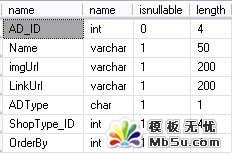
1.獲取表的基本字段屬性
2.如果還想要獲取字段的描述信息則
3.單獨查詢表的遞增字段

4.獲取表的主外鍵
--獲取SqlServer中表結構
SELECT syscolumns.name,systypes.name,syscolumns.isnullable,
syscolumns.length
FROM syscolumns, systypes
WHERE syscolumns.xusertype = systypes.xusertype
AND syscolumns.id = object_id('你的表名')
運行效果SELECT syscolumns.name,systypes.name,syscolumns.isnullable,
syscolumns.length
FROM syscolumns, systypes
WHERE syscolumns.xusertype = systypes.xusertype
AND syscolumns.id = object_id('你的表名')
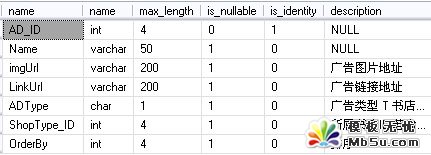
2.如果還想要獲取字段的描述信息則
--獲取SqlServer中表結構 主鍵,及描述
declare @table_name as varchar(max)
set @table_name = '你的表名'
select sys.columns.name, sys.types.name, sys.columns.max_length, sys.columns.is_nullable,
(select count(*) from sys.identity_columns where sys.identity_columns.object_id = sys.columns.object_id and sys.columns.column_id = sys.identity_columns.column_id) as is_identity ,
(select value from sys.extended_properties where sys.extended_properties.major_id = sys.columns.object_id and sys.extended_properties.minor_id = sys.columns.column_id) as description
from sys.columns, sys.tables, sys.types where sys.columns.object_id = sys.tables.object_id and sys.columns.system_type_id=sys.types.system_type_id and sys.tables.name=@table_name order by sys.columns.column_id
運行效果declare @table_name as varchar(max)
set @table_name = '你的表名'
select sys.columns.name, sys.types.name, sys.columns.max_length, sys.columns.is_nullable,
(select count(*) from sys.identity_columns where sys.identity_columns.object_id = sys.columns.object_id and sys.columns.column_id = sys.identity_columns.column_id) as is_identity ,
(select value from sys.extended_properties where sys.extended_properties.major_id = sys.columns.object_id and sys.extended_properties.minor_id = sys.columns.column_id) as description
from sys.columns, sys.tables, sys.types where sys.columns.object_id = sys.tables.object_id and sys.columns.system_type_id=sys.types.system_type_id and sys.tables.name=@table_name order by sys.columns.column_id
3.單獨查詢表的遞增字段
--單獨查詢表遞增字段
select [name] from syscolumns where
id=object_id(N'你的表名') and COLUMNPROPERTY(id,name,'IsIdentity')=1
運行效果select [name] from syscolumns where
id=object_id(N'你的表名') and COLUMNPROPERTY(id,name,'IsIdentity')=1
4.獲取表的主外鍵
--獲取表主外鍵約束
exec sp_helpconstraint '你的表名' ;
exec sp_helpconstraint '你的表名' ;
運行效果
分享:SQL Server2000安裝時出現錯誤及解決安裝SQL Server 遇到錯誤提示: 以前的某個程序安裝已在安裝計算機上創建掛起的文件操作。運行安裝程序之前必須重新啟動計算機!。 打開注冊表編輯器,在HKEY_LOCAL_MACHINESYSTEMCurrentControlSetControlSession Manager 中找到 PendingFileRenameOperations
相關Mssql數據庫教程:
- sql 語句練習與答案
- 深入C++ string.find()函數的用法總結
- SQL Server中刪除重復數據的幾個方法
- sql刪除重復數據的詳細方法
- SQL SERVER 2000安裝教程圖文詳解
- 使用sql server management studio 2008 無法查看數據庫,提示 無法為該請求檢索數據 錯誤916解決方法
- SQLServer日志清空語句(sql2000,sql2005,sql2008)
- Sql Server 2008完全卸載方法(其他版本類似)
- sql server 2008 不允許保存更改,您所做的更改要求刪除并重新創建以下表
- SQL Server 2008 清空刪除日志文件(瞬間日志變幾M)
- Win7系統安裝MySQL5.5.21圖解教程
- 將DataTable作為存儲過程參數的用法實例詳解
- 相關鏈接:
- 教程說明:
Mssql數據庫教程-如何獲取SqlServer2005數據庫表結構
 。
。